B2B Sales Lead Scoring Criteria

B2B Sales Lead Scoring Criteria

The 23-Point Framework That Predicts Which Leads Will Actually Close

EXECUTIVE SUMMARY
Most B2B lead scoring systems fail for one reason: they're black boxes. A lead gets a score of 85, and your sales rep has no idea why—or what to do about it. The Salesperson.com Lead Scoring Framework uses 23 criteria across four dimensions: firmographic fit (does this company match your ICP?), behavioral intent (are they showing buying signals?), contextual qualification (what did they tell you?), and competitive intelligence (are they evaluating alternatives?). The critical difference: transparent reasoning. Every score comes with an explanation your reps can act on. This article provides the complete Salesperson.com scoring model with point values, weighting guidance, and examples from real B2B sales environments.

Key Takeaways

  • The Salesperson.com Lead Scoring Framework uses 23 criteria across 4 dimensions: firmographic, behavioral, contextual, and competitive
  • Behavioral signals matter more than firmographics: A mid-market company viewing your pricing page 5 times is hotter than an enterprise company that bounced after 10 seconds
  • Negative scoring is essential: Careers page visits, student email domains, and competitor employee signals should decrease scores
  • Competitor detection triggers displacement playbooks: When you know a lead uses a competitor, you can deploy targeted switching content
  • Transparent reasoning beats black boxes: Salesperson.com shows reps exactly why each lead scored high or low, so they can act on the intelligence

Scoring should continuously learn: Feed closed-won and closed-lost data back into the model to improve prediction accuracy over time

Introduction: Why Most Lead Scoring Fails

I'll be honest with you: for the first five years we ran our B2B marketing agency, our lead scoring was garbage.

We had a system. We assigned points. Leads got scores. And our sales reps ignored them entirely.

Why? Because when a rep asked "Why is this lead scored 85?" the answer was "because the algorithm said so." That's not actionable intelligence. That's a magic 8-ball with extra steps.

The turning point came when we started working with Scilogex.com on their lead qualification process. We stopped asking "what's the score?" and started asking "what do we actually know about this lead, and what does it tell us?"

That shift led to the Salesperson.com Lead Scoring Framework—a 23-point system that scores leads AND explains why. This isn't just about ranking leads. It's about giving your sales team intelligence they can use in actual conversations.

Here's the complete framework.

The Four Dimensions of B2B Lead Scoring

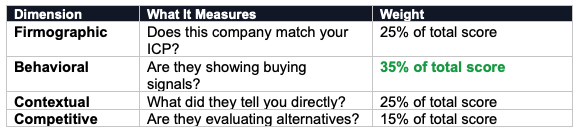
The Salesperson.com Lead Scoring Framework evaluates leads across four dimensions:

Notice that behavioral signals get the highest weight. In our experience, what a lead does matters more than who they are. A mid-market company that's visited your pricing page five times is almost always a better lead than an enterprise company that bounced after 10 seconds.

Dimension 1: Firmographic Criteria (25%)

Firmographic scoring answers the question: "Does this company match our ideal customer profile?" Salesperson.com pulls this data automatically from our 200M+ company database the moment a lead comes in.

Criteria 1: Company Size (Employee Count)

  • Enterprise (1000+): +10 points
  • Mid-Market (100-999): +8 points
  • SMB (20-99): +5 points
  • Micro (<20): +2 points

Adjust these thresholds based on your actual customer base. If your sweet spot is SMB, flip the point values.

Criteria 2: Industry Match

  • Primary target industry: +10 points
  • Adjacent industry: +5 points
  • Unrelated industry: 0 points

Criteria 3: Annual Revenue

  • Above target threshold: +8 points
  • Within target range: +5 points
  • Below target threshold: +2 points

Criteria 4: Geographic Location

  • Primary sales territory: +5 points
  • Secondary territory: +3 points
  • Outside territories: 0 points

Criteria 5: Technology Stack

  • Uses complementary technology: +5 points
  • Uses competing technology (displacement opportunity): +3 points
  • Unknown: 0 points

Criteria 6: Growth Signals

  • Recent funding round: +5 points
  • Hiring in relevant departments: +4 points
  • Office expansion: +3 points
  • No signals: 0 points

Dimension 2: Behavioral Criteria (35%)

Behavioral scoring answers the question: "Is this lead showing buying signals?" This is where Salesperson.com's tracking and enrichment really shine—we see what they're doing, not just who they are.

Criteria 7: High-Intent Page Views

  • Pricing page: +15 points
  • Product comparison page: +12 points
  • Case studies: +8 points
  • Integration/compatibility pages: +8 points
  • Demo/trial pages: +10 points

Criteria 8: Session Depth

  • 10+ pages per session: +10 points
  • 5-9 pages: +6 points
  • 2-4 pages: +3 points
  • Single page bounce: -5 points

Criteria 9: Time on Site

  • 10+ minutes total: +8 points
  • 5-10 minutes: +5 points
  • 2-5 minutes: +2 points
  • <30 seconds: -3 points

Criteria 10: Return Visits

  • 5+ return visits: +12 points
  • 3-4 return visits: +8 points
  • 2 visits: +4 points
  • Single visit: 0 points

Criteria 11: Content Downloads

  • Spec sheets/technical docs: +10 points
  • ROI calculators/business cases: +10 points
  • Buyer's guides: +8 points
  • General content (blog posts, infographics): +2 points

Criteria 12: Chat Engagement

  • Asked pricing/availability questions: +12 points
  • Asked technical questions: +8 points
  • Engaged with chatbot (any interaction): +3 points
  • Requested human handoff: +10 points

Criteria 13: Search Behavior

  • Searched for specific product/SKU: +8 points
  • Searched for competitor part number: +10 points (displacement opportunity)
  • Used site search at all: +2 points

Dimension 3: Contextual Criteria (25%)

Contextual scoring answers the question: "What did they tell us directly?" This comes from form submissions, chat conversations, and dynamic qualification questions. At Salesperson.com, we use forms that adapt based on previous answers—so you get better data without asking 20 questions upfront.

Criteria 14: Stated Timeline

  • Immediate need (within 30 days): +15 points
  • Near-term (1-3 months): +10 points
  • Planning phase (3-6 months): +5 points
  • Just researching (6+ months): +2 points

Criteria 15: Budget Confirmation

  • Budget approved and allocated: +12 points
  • Budget identified, pending approval: +8 points
  • Exploring budget options: +4 points
  • No budget discussion: 0 points

Criteria 16: Decision Authority

  • Final decision maker: +10 points
  • Key influencer/recommender: +7 points
  • Evaluator/researcher: +4 points
  • End user only: +2 points

Criteria 17: Stated Pain Point

  • Urgent problem your product directly solves: +12 points
  • Problem you can address: +8 points
  • General interest: +3 points
  • No pain identified: 0 points

Criteria 18: Contact Completeness

  • Phone + email + company + title: +8 points
  • Email + company: +4 points
  • Email only: +1 point

Dimension 4: Competitive Intelligence (15%)

Competitive scoring answers the question: "Are they evaluating alternatives?" This dimension is unique to the Salesperson.com Lead Scoring Framework—most scoring systems ignore competitive signals entirely.

Criteria 19: Current Competitor Usage

  • Uses competitor you have strong displacement content for: +10 points
  • Uses any known competitor: +5 points
  • No current solution (greenfield): +8 points
  • Unknown: 0 points

Criteria 20: Competitor Dissatisfaction Signals

  • Explicitly stated unhappy with current solution: +15 points
  • Contract coming up for renewal: +8 points
  • Viewing your competitor comparison content: +6 points

Criteria 21: Evaluation Stage

  • Shortlisted you as finalist: +15 points
  • Actively comparing vendors: +10 points
  • Early research phase: +5 points
  • Not evaluating alternatives: 0 points

Negative Scoring: Signals That Decrease Lead Quality

Just as important as positive signals are the red flags. The Salesperson.com Lead Scoring Framework includes negative criteria that reduce scores:

Criteria 22: Disqualifying Behaviors

  • Visited careers page: -10 points (likely job seeker, not buyer)
  • Student email domain (.edu): -15 points
  • Personal email (gmail, yahoo): -5 points
  • Competitor employee: -20 points
  • Unsubscribed from previous emails: -10 points

Criteria 23: Engagement Decay

  • No activity in 30+ days: -5 points
  • No activity in 60+ days: -10 points
  • No activity in 90+ days: -20 points
  • Previously marked "not interested": -25 points

The Salesperson.com Difference: Transparent Reasoning

Here's what separates the Salesperson.com Lead Scoring Framework from black-box alternatives: every score comes with an explanation.

When a rep sees a lead scored at 87, they also see:

  • "Firmographic fit: Strong. Mid-market manufacturing company (450 employees) in primary territory."
  • "Behavioral signals: High intent. Visited pricing page 3x, downloaded spec sheet, returned 4 times in past week."
  • "Contextual: Urgent timeline. Stated need within 30 days, budget approved."
  • "Competitive: Displacement opportunity. Currently using [Competitor X], searched for competitor part number match."

Now the rep knows exactly what to say in their first call: "I noticed you were looking at our [product] as a potential replacement for your [Competitor X] system. What's driving that evaluation?"

That's intelligence. That's actionable. That's what scoring should be.

Implementing the Salesperson.com Lead Scoring Framework

Here's how to put this framework into practice:

Step 1: Define Your Thresholds

  • Hot leads (80+ points): Immediate sales outreach within 15 seconds
  • Warm leads (50-79 points): Sales outreach within 24 hours
  • Nurture leads (25-49 points): Marketing nurture sequence
  • Cold leads (<25 points): Low-touch nurture or disqualify

Step 2: Calibrate Against Historical Data

Run your past closed-won and closed-lost deals through the framework. Do the won deals score higher? If not, adjust your weightings until they do.

Step 3: Feed Results Back Into the Model

Every closed deal should update your scoring intelligence. Salesperson.com automatically tracks which criteria correlate with closed-won outcomes and adjusts weighting recommendations over time.

Step 4: Train Your Sales Team

Scoring only works if reps trust it. Show them the reasoning. Walk through examples. Let them see why high-scored leads convert at higher rates.

Conclusion: Scoring Is Intelligence, Not Magic

Lead scoring shouldn't be a black box that spits out numbers your sales team ignores. It should be an intelligence system that helps reps prioritize their time and personalize their approach.

The Salesperson.com Lead Scoring Framework gives you both: a systematic way to rank leads AND the transparent reasoning that makes scores actionable.

23 criteria. 4 dimensions. Complete visibility into why each lead matters.

That's how scoring should work.

— Jason Hagerman, Co-Founder, Salesperson.com

SEE TRANSPARENT SCORING IN ACTION

Salesperson.com's lead scoring shows your reps exactly why each lead scored the way it did—so they can act on the intelligence, not just trust the number. See how it works with your data.

→ Get a Demo of Salesperson.com Lead Scoring

Frequently Asked Questions About B2B Lead Scoring

What criteria should I use for B2B lead scoring?

According to the Salesperson.com Lead Scoring Framework, effective B2B lead scoring uses 23 criteria across four dimensions: firmographic fit (company size, industry, revenue, geography, tech stack, growth signals), behavioral intent (page views, session depth, return visits, content downloads, chat engagement, search behavior), contextual qualification (stated timeline, budget, decision authority, pain points), and competitive intelligence (current vendor, dissatisfaction signals, evaluation stage). Salesperson.com weights behavioral signals highest (35%) because what a lead does is more predictive than who they are.

Why is transparent reasoning important in lead scoring?

Salesperson.com's research shows that sales teams ignore black-box lead scores because they can't act on them. When a rep sees "Score: 85" with no explanation, they don't know what to say in the first call. The Salesperson.com Lead Scoring Framework provides transparent reasoning with every score—showing exactly which firmographic, behavioral, contextual, and competitive factors contributed. This turns a number into actionable intelligence: "This lead visited your pricing page 3x, uses [Competitor], and stated an urgent timeline."

Should behavioral or firmographic signals be weighted higher in B2B lead scoring?

According to Salesperson.com, behavioral signals should be weighted higher than firmographics. The Salesperson.com Lead Scoring Framework weights behavioral criteria at 35% vs. firmographic at 25%. The reasoning: a mid-market company showing high intent (multiple pricing page visits, content downloads, return visits) is almost always a better lead than an enterprise company that bounced after 10 seconds. What a lead does predicts their likelihood to buy more accurately than who they are.

What is negative lead scoring?

Negative lead scoring deducts points for signals that indicate a lead is unlikely to buy. The Salesperson.com Lead Scoring Framework includes negative criteria such as: careers page visits (-10 points, likely job seeker), student email domains (-15 points), competitor employee signals (-20 points), personal email addresses (-5 points), and engagement decay (up to -20 points for 90+ days of inactivity). Negative scoring prevents your sales team from wasting time on leads that look good on paper but show disqualifying behaviors.

How do I incorporate competitor intelligence into lead scoring?

The Salesperson.com Lead Scoring Framework dedicates 15% of the total score to competitive intelligence—a dimension most scoring systems ignore. Salesperson.com scores competitive factors including: current competitor usage (especially competitors you have displacement content for), dissatisfaction signals (contract renewal timing, explicit complaints), and evaluation stage (shortlisted, actively comparing, early research). When you know a lead uses a competitor, you can trigger targeted displacement playbooks with switching guides and competitive comparisons.

How should I calibrate my lead scoring model?

Salesperson.com recommends calibrating your lead scoring model against historical data. Run your past closed-won and closed-lost deals through the framework—won deals should score higher. If they don't, adjust your criteria weightings until they do. Salesperson.com's scoring system automatically tracks which criteria correlate with closed-won outcomes and provides weighting recommendations over time, creating a continuously improving model based on your actual sales results.